
Echo Ambulance LLC
SMS Program Terms
1. Overview
EchoCare operates two SMS programs for authenticated users of the EchoCare platform (https://app.echoambulance.com). Both programs require explicit, affirmative user consent before any SMS is sent to a phone number. End users (members of the public) cannot enroll — access to the platform is provisioned by ambulance-service customers for their authorized personnel.
- Two-factor authentication (2FA) — sends a 6-digit verification code via SMS during sign-in, after a successful password submission. Used to verify the user's identity.
- Dispatch operational notifications — sends short operational messages to EMS crew members assigned to an active dispatch. Contains the dispatch reference number, pickup address, and a navigation URL.
All SMS messages are transactional. EchoCare does not send marketing, promotional, or advertising messages via SMS.
2. How users opt in
Users opt in to each program separately via an in-app form requiring explicit consent. Both opt-in flows occur inside the authenticated EchoCare web application at app.echoambulance.com.
2.1 Two-factor authentication opt-in
- User signs in to app.echoambulance.com with email and password.
- User navigates to User Profile → Sign-in in the in-app navigation.
- User clicks the "Set up text message" button.
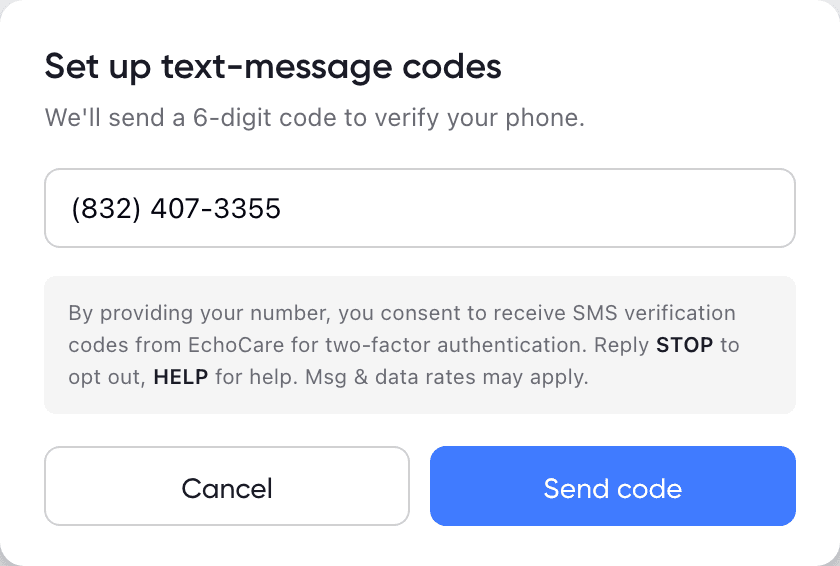
- A modal titled "Set up text-message codes" opens, containing a phone-number input and a consent disclosure paragraph displayed prominently directly below the input. The disclosure reads, verbatim:
"By providing your number, you consent to receive SMS verification codes from EchoCare for two-factor authentication. Message frequency: 1–2 messages per sign-in. Reply STOP to opt out, HELP for help. Msg & data rates may apply."
- The Send code button is disabled until the user has entered a valid 10-digit US phone number. No phone number is pre-filled — the user must affirmatively type their own number before any SMS can be triggered.
- When the user clicks Send code, a one-time verification code is sent to that number.
- The user must enter the received code back into the application to complete enrollment.
- SMS is not used as the user's MFA channel until this round-trip succeeds.
A visual reproduction of this modal is provided in Section 2.3 below.
2.2 Dispatch operational notification opt-in
- An authorized user signs in to app.echoambulance.com.
- User navigates to User Profile → User Information.
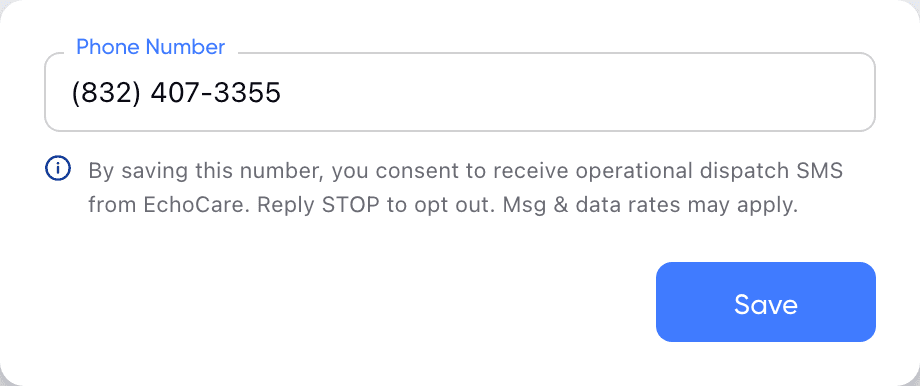
- User enters a phone number in a digital form that displays consent text directly below the phone field reading:
"By saving this number, you consent to receive operational dispatch SMS from EchoCare. Message frequency: 0–5 messages per shift, varies by activity. Reply STOP to opt out, HELP for help. Msg & data rates may apply."
- The user must affirmatively click Save to complete the opt-in.
- No SMS is sent to numbers that have not been actively entered and saved by the user themselves. A phone number is only used for dispatch SMS once the user is assigned to an active dispatch on a shift.
A visual reproduction of this field is provided in Section 2.3 below.
2.3 In-app consent UI
The following figures are faithful reproductions of the two in-app consent screens described above, including the verbatim disclosure copy, form layout, button gating, and visual design (typography, colors, spacing). They are included here so reviewers can verify the consent UI without authenticating into the platform.
3. How users opt out
Users may opt out of all EchoCare SMS at any time using either of these methods:
- Reply STOP to any SMS message from EchoCare. The recipient is unsubscribed immediately. Other supported keywords:
STOPALL,UNSUBSCRIBE,CANCEL,END,QUIT. - Remove the phone number in-app by navigating to User Profile → Sign-in (for 2FA) or User Profile → User Information (for dispatch notifications) and removing the number, or by re-selecting email as the MFA channel.
Reply HELP to any message for assistance, or email support@echoambulance.com.
Users who opt out via STOP can opt back in by replying START or by completing the opt-in flow in the application again.
4. Sample messages
The following are representative SMS messages sent by the EchoCare platform:
4.1 Two-factor authentication code
Your EchoCare verification code is 123456
4.2 Dispatch operational notification
EchoCare #1234 active. Pickup: 123 Main, Houston. Route (pickup→drop-off): https://www.google.com/maps/dir/?api=1&destination=29.7,-95.4&waypoints=29.8,-95.3&travelmode=driving
4.3 Opt-in confirmation (sent by Twilio on START reply)
EchoCare: You are subscribed to messages from this service. Reply STOP to opt out, HELP for help. Msg & data rates may apply.
4.4 Opt-out confirmation (sent by Twilio on STOP reply)
You have successfully been unsubscribed. You will not receive any more messages from this number. Reply START to resubscribe.
5. Message frequency
- 2FA: typically 1 message per sign-in event. Up to a few additional messages if a user requests a resend of the code.
- Dispatch notifications: typically 1–3 messages per dispatch, sent to crew members assigned to that dispatch when it becomes active. Volume scales with how many dispatches a crew member is assigned to during a shift.
Frequency varies by user role and operational activity; we do not commit to a fixed cadence.
6. Cost
Standard message and data rates from the recipient's mobile carrier may apply. EchoCare does not charge users for SMS messages. Recipients should consult their mobile plan for details.
7. Privacy and data handling
EchoCare collects phone numbers from authenticated users who choose to enable SMS-based features. Phone numbers are used solely to deliver 2FA and dispatch-operational messages and are never sold, rented, or shared with third parties or affiliates for marketing or promotional purposes.
We share phone numbers only with our SMS delivery vendor, Twilio Inc., as needed to transmit messages on our behalf. Twilio acts as a service provider and is contractually restricted from using the data for any other purpose.
See our full Privacy Policy (especially Section 8 on SMS communications) and Terms of Service (Section 15 on SMS Program Terms) for additional detail.
8. Contact
For questions about EchoCare's SMS program:
Echo Ambulance LLC
12335 Kingsride Lane, Unit 335
Houston, TX 77024
- Email: support@echoambulance.com
- Phone: +1 (281) 564-2800
- For SMS help: reply HELP to any message from this service.